
If you're running a small restaurant or cafe on ResDiary and looking at alternatives, the trigger is usually one of two things: the monthly bill has crept higher than you expected once add-ons are counted, or you've hit the booking cap on your tier and got pushed toward a more expensive one. Neither means ResDiary is a bad product — it's a genuinely capable system with a long track record. It means the pricing is built around booking volume and add-on modules, and it's worth checking whether that structure matches what your venue actually needs.
What ResDiary actually costs
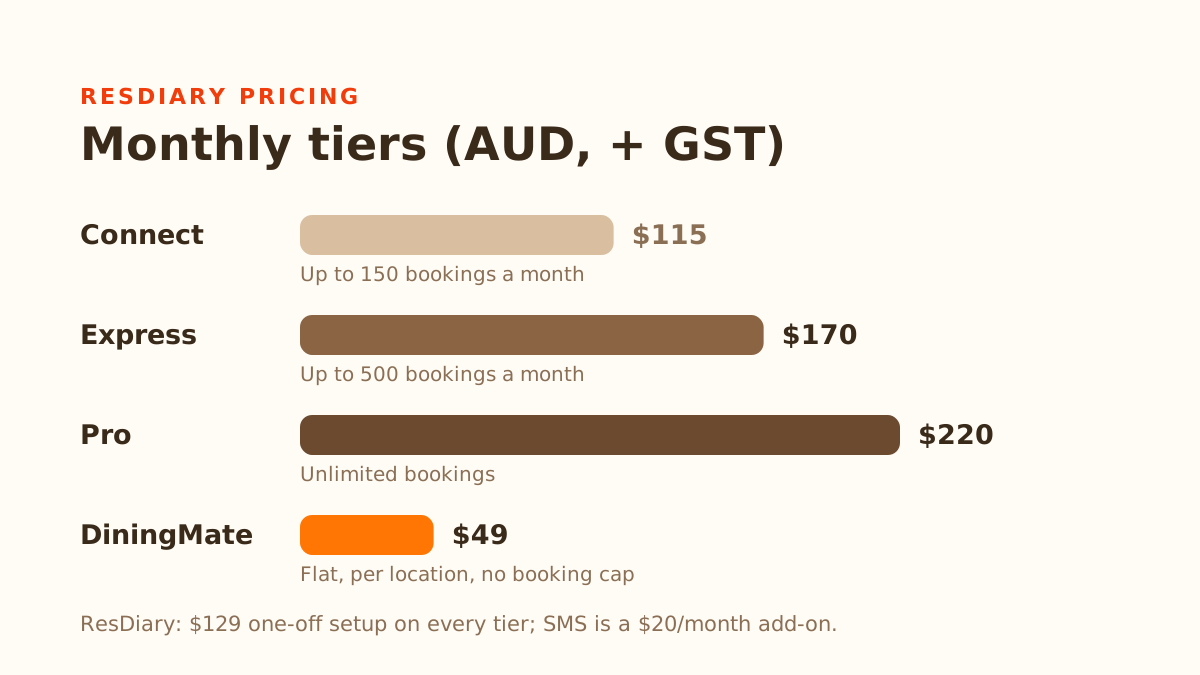
ResDiary's Australian pricing is tiered by monthly booking volume, not a single flat number. These are the figures on its AUD pricing page as of September 2026:
- Connect — $115/month (+ 10% GST), capped at 150 bookings/month
- Express — $170/month (+ 10% GST), capped at 500 bookings/month
- Pro — $220/month (+ 10% GST), unlimited bookings
All three tiers carry a $129 one-off setup fee. SMS is a separate $20/month add-on, and the pricing page notes that SMS fees apply on top of that. Processing deposits and payments carries a 1% surcharge (3% on gift vouchers). The base subscription itself is commission-free — ResDiary doesn't take a cut per booking. But "commission-free" and "the number on your invoice" are two different things once setup, SMS, and processing surcharges are added in.
The booking cap is the detail that catches small venues off guard. A 40-to-50-seat restaurant doing two to three turns most nights can reach 150 bookings in a normal month. Near that cap, you're not upgrading to Express for more features; you're upgrading because the cheaper tier stopped fitting your volume.
What small venues use versus what they're paying for
ResDiary's feature set includes table management, yield management by covers and time-slots, promotions, EPOS, PMS and CRM integrations, and deposits and prepayments — all genuinely useful for a venue that runs frequent promotions, manages yield across a large floor, or needs its booking system tied into other tools.
Much of that goes unused at a single-location venue that just wants guests to book without calling. If you've never touched the yield settings, don't run promotions through the platform, and don't need integrations, you're paying tier pricing that assumes you'll grow into features you may never use.
Before moving up a ResDiary tier, or switching platforms entirely, be honest about which of these you actually use:
- Do you run promotions or manage yield through the platform, or do you set your own prices and availability manually?
- Do you use the EPOS, PMS or CRM integrations, or do you handle guest marketing through a separate tool anyway?
- Is SMS confirmation something guests expect from you, or would email cover it? ResDiary charges a $20/month add-on for SMS, with SMS fees listed on top.
- Are you near the booking cap because of genuine growth, or because a review site or Google listing sends discovery traffic you can't convert into repeat, direct bookings?
What to check in any alternative
If the answer to most of the above is "no, I don't use that," a simpler flat-fee tool is worth trialling. But check these first — they're where small venues get caught out:
Is the price actually flat, or does it grow with your booking volume? Some "flat fee" alternatives still cap bookings per month like ResDiary does, just at a different number. Ask directly: is there any volume at which my bill goes up?
What are the contract terms? Whichever platform you choose, confirm the minimum term, how renewals work, the notice period to cancel, and any cancellation fee, so you know exactly what you're agreeing to.
Does it send SMS, and what does that cost? Some tools charge extra for it, and some don't offer it at all.
What happens to your existing guest history? If you've built up a customer list with visit notes, allergy flags, or no-show history in ResDiary, ask what's exportable before you cancel anything. Losing that history costs more than the subscription difference for a venue that relies on regulars.
Does no-show protection charge guests upfront, or only when they don't show? A system that charges a card at the moment of booking turns every reservation into a small checkout, which adds friction exactly when someone is deciding whether to book with you at all. A system that only saves the card and charges it if the guest no-shows or cancels late still asks for card details, so it isn't friction-free — but nothing is taken up front, which is a much easier ask, and it protects the same revenue.
Is there a setup fee, and is there a real trial period? Compare ResDiary's $129 setup fee against what an alternative charges to start, and how long you can test it with real guests before paying. Use the trial to check any promised booking uplift or integration in your own venue.
Where DiningMate fits, specifically
DiningMate is built for the venue on the "no, I don't use most of that" side of the questions above: a flat $49/month per location, no per-booking fee, no booking cap, and no setup fee. There's a 3-month free trial with no card required. It's month-to-month: no annual contract and no cancellation fee, and you can cancel at any time.
Two things to know up front. DiningMate doesn't send SMS — booking confirmations and reminders go out by email only. And its no-show protection is an optional setting each venue turns on: guests enter a card when they book, it's held on file with nothing charged, and you charge it only if a guest no-shows or cancels late.
One more feature worth mentioning, which isn't listed on ResDiary's pricing or features pages: guests can book by typing or speaking a plain-language request like "table for 2 tomorrow night," in English, Korean, Chinese, or French, alongside a standard booking form. It's an additional option, not a replacement for the form — useful if part of your guest base would rather not fill out an English-only one.
What DiningMate doesn't have that ResDiary does: SMS, promotions tooling, and EPOS, PMS or CRM integrations. If you use those, or your guests expect a text confirmation, ResDiary remains the better-suited option.
The honest way to decide
Pull your last three months of ResDiary invoices and monthly booking counts. If you're consistently well under the cap on your current tier and not touching the yield, promotions or integration features, you're likely paying for headroom you don't need — a trial is a cheap way to find out. If you're near the cap because of genuine growth, or you rely on the features that come with it, your current ResDiary tier (or the one above) is probably the right fit, and switching would mean rebuilding functionality you use.