The thing that stops a lot of owners from switching off phone bookings isn't the phone bookings themselves — it's not knowing what the first week of a new system actually looks like. Will you have to stop taking bookings while you set it up? Will your staff need training mid-service? What happens to the reservations already in your diary for next weekend? Those questions are reasonable, and most booking software doesn't answer them anywhere on its pricing page.
Here's a realistic walkthrough of what setup actually involves, based on how the process works day to day — not a sales pitch, just what to expect.
Before you touch anything: the trial starts with no commitment
You don't need to decide anything on day one beyond creating an account. DiningMate's trial runs for three months and doesn't ask for a card to start, so there's no clock quietly running down toward a charge you forgot about, and no need to get sign-off from anyone before you've actually seen the dashboard. That matters more than it sounds — it means you can poke around during a slow Tuesday afternoon instead of feeling pressure to commit before you understand what you're committing to.
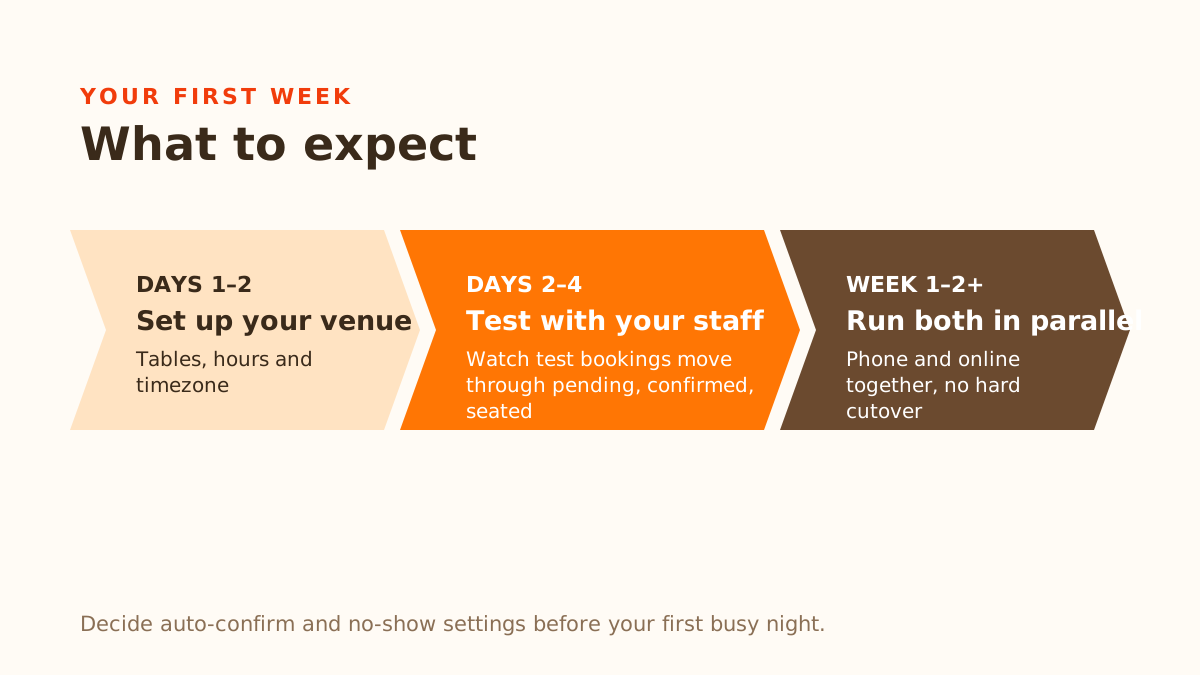
Day 1–2: setting up your venue
The actual setup work is mostly data entry, and it's the kind you already know off the top of your head: your tables (how many, what size, which ones can be pushed together for larger groups), your operating hours, and your timezone. This is where the system learns your floor, not the other way around — you're not adapting your restaurant to fit the software's assumptions about how a dining room works.
This step is the one owners tend to underestimate the time for, not because it's hard, but because getting table combinations right takes a bit of thought if your floor plan has a lot of flexible seating. Budget an hour with someone who actually knows the floor — a manager or senior server — rather than delegating it sight unseen. Get this part right and the automatic table assignment behaves the way you'd expect from day one.
Day 2–4: getting comfortable with the dashboard before guests see anything
Before any guest touches the new system, this is the window to get your team looking at the dashboard without the pressure of a live service. A booking request comes in, gets checked against your table layout automatically, and shows up with a status — pending, confirmed, seated, completed, no-show, or cancelled — instead of living only in someone's memory or a paper diary. The point of a few quiet days here is for staff to see that flow happen a handful of times before it matters, so the first live booking during a Friday rush isn't also the first time anyone's looked at the screen.
If you're going to turn on optional settings — auto-confirming new bookings instead of approving each one by hand, or no-show protection where a guest's card is held on file and only charged if they don't show or cancel late — this is the time to decide, not mid-service on a Saturday.
The realistic rollout: run both at once, don't flip a switch
Almost nobody replaces phone bookings outright in week one, and you shouldn't force it. The practical approach is running the new system alongside your phone for a stretch — guests who'd rather call keep calling, and whoever answers just enters that booking into the dashboard like any other. This isn't a compromise or a sign the system isn't ready; it's the actual adoption path, because it means the first online-only Friday night for your team happens after they've already seen a week or two of confirmed bookings flow through without incident, not on faith.
Existing bookings you've already taken by phone for the coming weeks don't need to move anywhere — enter new ones going forward, and let old commitments play out as scheduled. There's no data migration step that has to happen before you can start.
What guests notice, and what they don't
Guests booking online will see a standard form, and — if they'd rather not fill one out — the option to type or speak something like "table for 2 tomorrow night" instead. That's genuinely optional; nobody's forced to use it, and it sits alongside the form rather than replacing it. It also isn't English-only on the input side — it understands the same kind of request typed in Korean, Chinese, or French, which matters if part of your regular guest base would rather not compose an English sentence to book a table. The booking form itself is still English-only today, so that gap is really about typing versus a form, not about language support generally.
One thing worth setting expectations on internally: confirmations and reminders go out by email, not SMS. If your guests are used to getting a text, they'll get an email instead — worth a quick heads-up to your team so nobody's caught off guard by a guest asking "did my booking go through" when the confirmation landed in an inbox instead of a phone.
What actually goes wrong in week one
Being honest about this matters more than pretending setup is flawless. The most common hiccup isn't the software — it's a table combination that wasn't set up quite right, so a party of six gets flagged as unassignable when it shouldn't be. That's a two-minute fix once someone notices it, but it usually takes one real booking to surface, which is exactly why the quiet dashboard-familiarisation days before go-live are worth doing rather than skipping.
The second most common thing: a staff member forgets to check the dashboard during a busy stretch, and a pending request sits unanswered longer than it should. A system that's technically working doesn't help if nobody's looking at it — this is the same discipline phone bookings required, just moved to a different device.
A rough week-one checklist
- Create an account and load your tables, hours, and timezone — budget an hour with someone who knows the floor.
- Spend a couple of quiet days with staff watching test bookings move through pending → confirmed → seated before any guest sees it live.
- Decide on auto-confirm and no-show protection settings before your first busy night, not during it.
- Run phone and online bookings in parallel for at least a week or two — don't force a hard cutover.
- Tell your team confirmations go out by email, not text, so guest questions don't catch anyone off guard.
None of this requires blocking out a slow week or closing early to get set up. It fits around service, because it's meant to — a system you can only configure when the restaurant is closed isn't one that respects how little spare time restaurant staff actually have.